안녕하세요. diorama 스타일의 이미지를 몇개 뽑았는데 그중에서 '파도와등대' 를 한번 영상으로 만들어 볼까해서
글을 올립니다.
https://memorywalker.tistory.com/25
cumfyui wan2.2 모델 설치와 영상 만들어보기
안녕하세요. 요즘 틈틈이 글을 올리고 있는 블로그 지기입니다.이번 포스팅에서는 요즘 로컬 컴퓨터에서 많이 돌리는 wan에 대해서 적어볼까 합니다.저도 배우고 있고 배우면서 시도했던 것 그
memorywalker.tistory.com
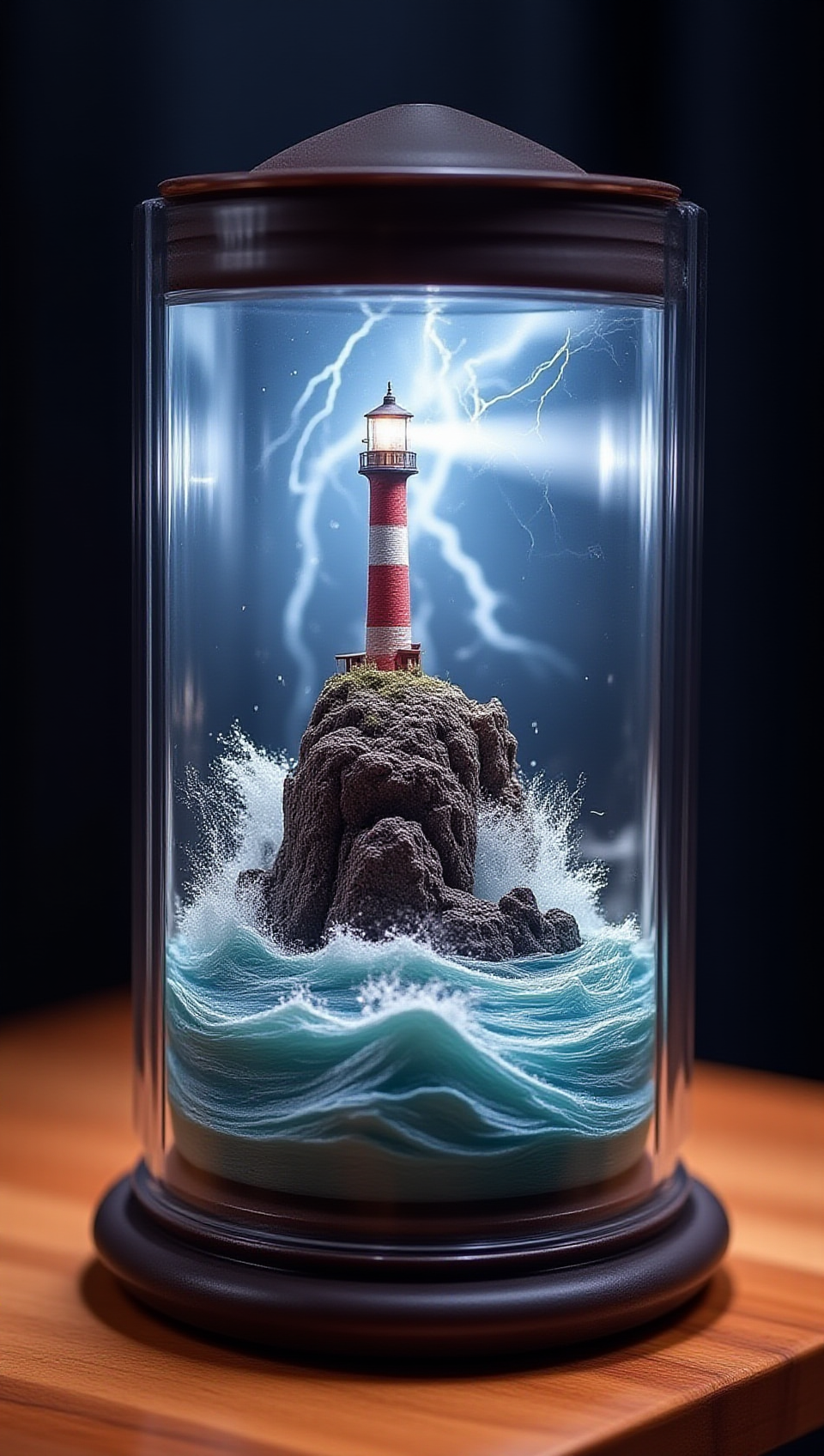
lora 프롬프트 실험실에서 diorama 스타일 로라를 이용해서 만든 이미지인데요. 프롬프트를 아래 처럼 추가 해주었습니다.
- 등대 조명 회전: 빛의 방향을 (illuminating the right side), (illuminating the front), (illuminating the left side), (illuminating the back) 등으로 순차적으로 지시하여 한 바퀴 도는 효과를 만듭니다.
- 파도 & 번개 유지: 파도는 계속 역동적으로 치고, 번개는 불규칙적으로 나타나도록 스케줄링합니다.
Wan2.2용 프롬프트 구성 (키프레임 스케줄링 가정):
이 프롬프트들은 ComfyUI의 프롬프트 스케줄링 기능을 사용하여 프레임 구간별로 적용해야 합니다.
I. 시작 (3시 방향 빛, 파도, 번개 대기)
(A detailed diorama of a lighthouse on a rocky island under a glass cylinder:1.4), (red and white striped lighthouse:1.2) on a rugged rock, (powerful beam of light from the lighthouse illuminating the right side of the cylinder:1.6), (large ocean waves crashing against the rocks, turbulent water:1.5), (dark stormy sky, distant thunder:1.2), wooden base, highly detailed, realistic, cinematic lighting.
- 주요 키워드 설명: 현재 이미지 상태를 반영하여 등대 빛이 오른쪽(3시 방향)을 비추는 것으로 시작합니다.
II. 빛 회전 1 (12시 방향으로 이동) + 파도 + 번개 대기
(A detailed diorama of a lighthouse on a rocky island under a glass cylinder:1.4), (red and white striped lighthouse:1.2) on a rugged rock, (powerful beam of light from the lighthouse sweeping towards the front, illuminating the central part of the cylinder:1.6), (dynamic ocean waves crashing, frothy water:1.5), (dark stormy sky, heavy clouds:1.3), wooden base, highly detailed, realistic, cinematic lighting.
- 주요 키워드 설명: 등대 빛이 앞으로(12시 방향) 이동하는 효과를 줍니다.
III. 빛 회전 2 (9시 방향으로 이동) + 파도 + 번개 치는 순간
(A detailed diorama of a lighthouse on a rocky island under a glass cylinder:1.4), (red and white striped lighthouse:1.2) on a rugged rock, (powerful beam of light from the lighthouse sweeping towards the left side, illuminating the left side of the cylinder:1.6), (massive ocean waves crashing, spray and foam:1.5), (bright, branching lightning bolt striking from the sky:1.8), (momentary intense flash from lightning:1.5), dark stormy sky, wooden base, highly detailed, realistic, cinematic, dramatic lighting.
- 주요 키워드 설명: 등대 빛이 왼쪽(9시 방향)으로 이동합니다. 번개가 이 시점에서 한번 강하게 치는 효과를 줍니다.
IV. 빛 회전 3 (6시 방향으로 이동) + 파도 + 번개 대기 (혹은 약하게)
(A detailed diorama of a lighthouse on a rocky island under a glass cylinder:1.4), (red and white striped lighthouse:1.2) on a rugged rock, (powerful beam of light from the lighthouse sweeping towards the back, illuminating the rear part of the cylinder:1.6), (strong ocean waves, turbulent water:1.5), (dark stormy sky, distant thunder:1.2), wooden base, highly detailed, realistic, cinematic lighting.
- 주요 키워드 설명: 등대 빛이 뒤쪽(6시 방향)으로 이동하는 효과를 줍니다. (이때는 이미지 상으로는 잘 보이지 않을 수 있습니다.)
V. 빛 회전 4 (다시 3시 방향으로) + 파도 + 번개 대기
(A detailed diorama of a lighthouse on a rocky island under a glass cylinder:1.4), (red and white striped lighthouse:1.2) on a rugged rock, (powerful beam of light from the lighthouse sweeping back towards the right side, illuminating the right side of the cylinder:1.6), (large ocean waves crashing, frothy water:1.5), (dark stormy sky, heavy clouds:1.3), wooden base, highly detailed, realistic, cinematic lighting.
- 주요 키워드 설명: 빛이 다시 오른쪽(3시 방향)으로 돌아와 한 바퀴 회전이 완료됩니다. 이 프롬프트 시퀀스를 반복하여 계속 회전하는 효과를 줍니다.
●미리보기
동영상 서비스가 종료되어 해당 콘텐츠를 재생할 수 없습니다.
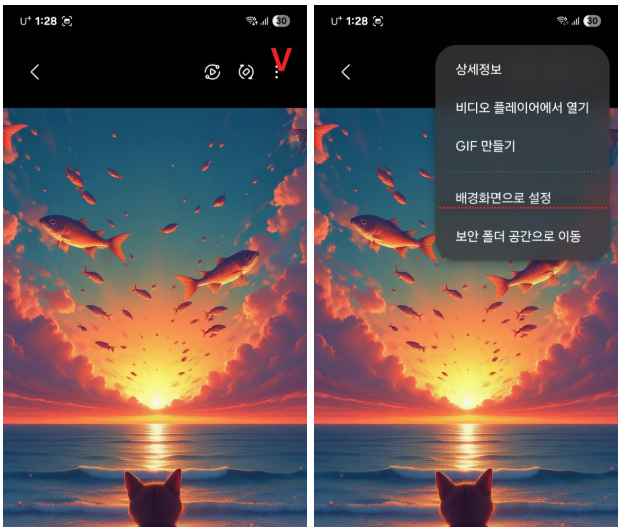

★다운로드하시고 동영상 선택 후 갤러리 옵션에서 배경 설정 잠금화면으로 하시면 됩니다.
   더 좋은 이미지를 만들고 공유해 보도록 하겠습니다. 감사합니다.
'동영상 실험실(wan,comfyui)' 카테고리의 다른 글
| diorama 스타일을 이용한 wan2.2 '크리스마스소품' (0) | 2025.09.24 |
|---|---|
| flux+wan2.2 밤의 사냥꾼 올빼미 날다. (0) | 2025.09.23 |
| wan 2.2 셀카 찍을려는 고양이 (0) | 2025.09.22 |
| cumfyui와wan 2.2로 만든 서핑하자 냥 (0) | 2025.09.18 |
| wan2.2 제트스키 타자냥 (0) | 2025.09.18 |


